
Great Teaching Teams include a dedicated Meetings tab where you can organise your team's meetings. Meetings provide a structured opportunity for colleagues to collaborate, discuss their learning and share their expertise.
To set up a meeting:
- Open your Great Teaching Team
- Select the Meetings tab
- Click on ‘Add or edit team meetings’
- Add the meeting details, including the date and time
- Select ‘Save’
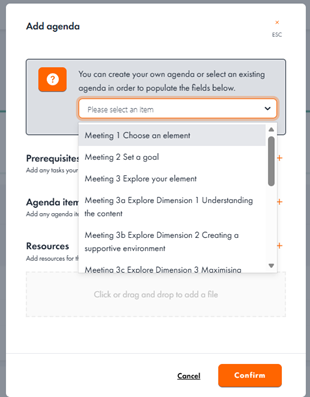
Everyone in the team will now see this in their Teams workspace - Click on your chosen meeting from the list and select ‘Add agenda’
- Add your own prerequisites, agenda items and resources, or select from one of our meeting agendas aligned with the different stages of the development cycle
- Make any updates or edits to the meeting agenda before clicking ‘Confirm’
Everyone in the team will now see the agenda items in their Teams workspace
You can return to the Meetings tab at any time to make updates to the meeting details using the ‘Add or edit meetings’ or the ‘Edit agenda’ buttons.